Creating a convincing golf simulator experience hinges on more than graphics and sensors. Proper lighting enhances depth, reduces eye strain, and minimizes glare on screens. The right mix of ambient, task, and accent lighting can help you judge distances more accurately and stay comfortable during long practice sessions. This guide highlights five lighting-focused products that can improve your indoor setup, from RGB underbody kits to blackout curtains and projector accessories. Use the summary table below to compare options quickly, then explore each product’s details to understand how lighting choices support your swing analysis and immersion.
| Product | Brand | Key Benefit |
|---|---|---|
| LEDGlow Million Color Underbody Kit (4-Seater) | LEDGlow | RGB underglow for ambient accent |
| LEDGlow Standard Million Color Underbody Kit | LEDGlow | Classic RGB underbody lighting |
| 10L0L Deluxe Golf Cart Headlights Kit | 10L0L | High-visibility LED headlights |
| CCS Blackout Curtain For Golf Simulators | CCS CHICAGO CANVAS & SUPPLY | Light control and sound damping |
| GoSports Projector Cover With Turf | GoSports | Floor-mounted projector protection |
Note: The items below are selected for their relevance to lighting control, ambient effects, glare management, and projector environment within indoor golf simulators. Each product section includes a concise overview, key features, and practical considerations for installation in typical home setups.
LEDGlow Million Color Underbody Kit For Golf Carts

The LEDGlow Million Color Underbody Kit (4-Seater) is a four-piece RGB lighting kit designed to create vibrant undercar lighting that can enhance ambient visuals around a golf simulator setup. The system uses 84 SMD LEDs across two 28-inch tubes and two 18-inch tubes, offering ten solid colors plus multiple effects (strobe, fade, flash, color cycle, gradient, and demo modes). A 12-volt powered control box with wireless remotes lets you switch colors and effects without cluttering the space. Durable and water-resistant tubes are built for flexible placement around the cart or indoor display area, making it a versatile option for mood lighting and signaling zones around the simulator space.
- 4-piece RGB underbody kit with 84 SMD LEDs
- Includes 2x 28″ and 2x 18″ tubes and a control box
- 10 solid colors plus multiple effect modes
- Wireless remotes for easy in-room control
- Water-resistant tubes suitable for indoor use
Ideal for adding dynamic ambient lighting that complements screen visuals and minimizes harsh reflections on the screen surface during practice sessions.
LEDGlow Standard Million Color Underbody Kit

The Standard Million Color Underbody Kit provides versatile RGB underglow lighting to enhance the ambiance around a golf simulator setup. It features four underbody tubes that house 48 SMD LEDs across four tubes, delivering a wide color range and smooth color transitions. The included control box supports a variety of modes and color selections, enabling you to tailor lighting to streaming, practice, or gameplay scenarios. The kit is designed to be compatible with most 12-volt golf carts or similar installations, offering a straightforward upgrade for room lighting or cart-based illumination near a portable sim setup.
- Four tubes with 48 LEDs total
- Wide color palette and multiple modes
- Compatible with 12-volt power systems
- Simple installation for quick ambient upgrades
Great for adding a consistent, eye-catching glow around your simulator space or cart-based display without complex wiring.
10L0L Deluxe Golf Cart Headlights Kit

The 10L0L Deluxe Golf Cart Headlights Kit supplies high-intensity LED headlights designed for universal fit across Yamaha, Club Car, EZGO, and other carts. The no-drill design facilitates quick installation, with a focus on brightness—claimed as significantly higher than traditional halogen lighting. The kit is engineered for safer, better-lit driving around the course or home facility and can also serve as task lighting for around a simulator setup in dim environments. The setup process is described as fast and straightforward, typically requiring only a few drilled or pre-drilled openings for mounting.
- No-drill universal installation
- Automotive-grade LED performance, brighter than halogen
- Focused beam for enhanced visibility
- Quick installation in about five minutes
These headlights can improve room safety and provide an additional lighting layer for late-evening practice sessions or outdoor-adjacent simulator setups.
CCS Black Golf Simulator Curtain — 10×10 Ft
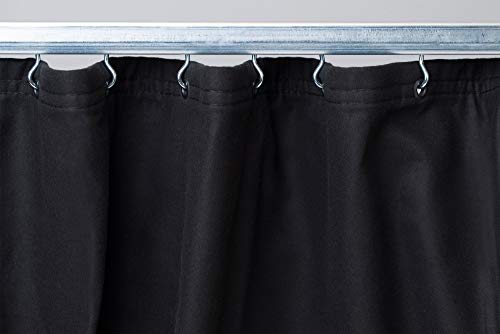
The CCS Black Golf Simulator Curtain is a 10×10-foot blackout panel designed specifically for indoor golf setups. Made from dense, non-reflective cotton, it helps block backlight and dampen sound for a more focused environment. The curtain includes rustproof grommets spaced along the top edge and a bottom pocket for added weight or support, ensuring stable placement around your screen or staging area. It’s machine washable and wrinkle-free with light ironing or steaming, making maintenance easy for frequent use. This curtain is a practical asset for controlling glare and improving room acoustics during play.
- 100% black cotton blackout material
- Blocks backlight and dampens sound
- Grommets for easy hanging and a bottom weight pocket
- Machine washable and wrinkle-free
Opt for this curtain to manage light bleed and create a more immersive display, especially in rooms with ambient outdoor lighting or windows.
GoSports Golf Simulator Projector Cover With Turf
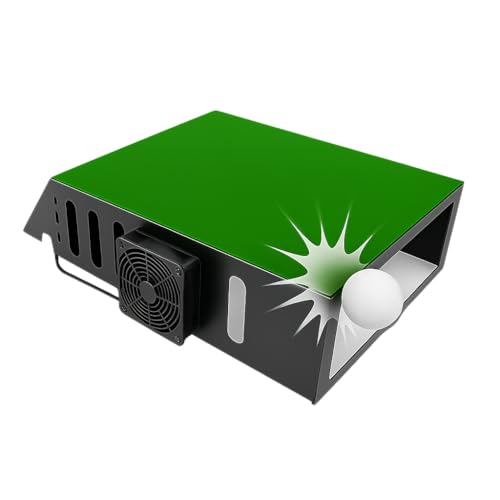
The GoSports GoSports Golf Simulator Projector Cover With Turf is a floor-mounted enclosure designed to house and protect the projector used in sim setups. The floor-mount design eliminates the need for ceiling studs or lifts, allowing flexible positioning relative to the screen. It features a universal steel frame and a built-in cooling fan mount with side vents to help keep the projector cool during extended practice sessions. The unit is not rated for waterproof use, so placement should consider indoor dry environments and heat dissipation. The turf surface helps blend the projector with the overall sim aesthetic while preventing scuffs from swings.
- Floor-mounted enclosure for projector placement
- Universal steel frame with side vents for cooling
- Protects projector from impacts and mis-swings
- Not waterproof; indoor use recommended
This enclosure is a practical option for creating a clean, organized projector zone that minimizes clutter and light interference in a dedicated golf simulator room.
Buying Guide
Key purchase considerations help balance lighting needs with space, budget, and setup complexity. The following perspectives cover common scenarios for home sim spaces:
- Lighting goals: Choose ambient RGB kits for mood and space definition, or select blackout curtains to control glare when the projector is bright. For drive-time realism, combine task lighting around screens with accent lighting to reduce eye strain.
- Space and layout: Floor-mounted projector enclosures and underbody lighting work well in rooms with limited ceiling height. For larger bays, ambient LED strips and curtain-based light control can create a cohesive environment without crowding the ceiling area.
- Brightness and color: Look for products offering multiple colors and brightness levels. Warmer tones (around 2700–3500K) reduce glare, while cooler tones (5000–6500K) can improve screen contrast. High CRI helps render colors more accurately on a display.
- Durability and maintenance: Indoor lighting and curtains should resist wear, dust, and daily handling. Water resistance matters mainly for external light kits or carts used outdoors, while machine-washable curtains simplify upkeep.
- Ease of installation: No-drill headlight upgrades and floor-mounted enclosures shorten setup time. Consider products with clear instructions, modular components, and remote controls for quick adjustments during practice.
- Power and compatibility: Verify voltage requirements match your space, and ensure accessories fit your cart or projector model. Universal designs help avoid custom modifications and simplify future upgrades.
- Cost vs. value: Compare long-term benefits such as improved immersion, reduced eye fatigue, and easier setup against upfront expenditures. A mix of ambient lighting, light-control options, and projector protection often yields the best overall value.
In summary, the right combination of ambient lighting, light-control, and projector protection can significantly improve the usability and immersion of a home golf simulator. Consider your room’s natural light, typical practice duration, and how often you adjust settings when selecting lighting upgrades for a balanced, comfortable experience.