As home golf simulators gain popularity, players seek launch monitors that deliver precise data, easy setup, and reliable compatibility with virtual courses. This guide highlights five top options, spanning professional-grade systems and portable devices suitable for living rooms, garages, or dedicated bays. Each pick balances accuracy, latency, and course libraries to fit different spaces and goals. Whether you want in-depth analytics, video integration, or a broad library of practice ranges, these launch monitors are designed to maximize your simulator sessions and help you improve.
| Product | Brand | Notable Metrics | Best For |
|---|---|---|---|
| FlightScope Mevo+ Launch Monitor And Simulator | FlightScope | 22+ data parameters, vertical & lateral impact, 12 E6 courses, 17 practice ranges | All-around data-driven practice and indoor/outdoor versatility |
| Rapsodo MLM2PRO Golf Launch Monitor | Rapsodo | Spin rate, spin axis, swing speed, ball speed, launch angle | Real-time swing tracking and home simulator use |
| Garmin Approach R50 Premium Golf Launch Monitor | Garmin | 10″ touchscreen, 3-camera precision, course library highlights | Premium visuals and integrated simulator experience |
| Garmin Approach R10 Portable Launch Monitor | Garmin | Portable, IPX7 waterproof, battery life up to 10 hours | Compact, flexible practice anywhere |
| Uneekor Eye MINI LITE Indoor Launch Monitor | Uneekor | Near-zero latency, 19 metrics, 3-Month Trial for software | High-end accuracy with PC-based simulation |
FlightScope Mevo+ Launch Monitor And Simulator
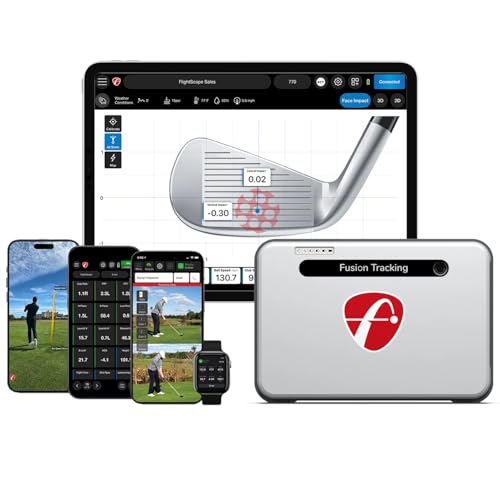
The FlightScope Mevo+ uses FlightScope Fusion Tracking technology to deliver a comprehensive set of swing and ball data. With 22+ parameters, including vertical and lateral impact, players gain insights into their performance from indoors or outdoors. The Mevo+ can pair with a smartphone or tablet to transform any space into a functional golf simulator, offering virtual courses and detailed swing analysis without requiring a professional setup. Its library includes 12 E6 courses and 17 practice ranges, providing ample environments to practice distance control, accuracy, and shot shape.
Real-time feedback covers essential metrics such as ball speed, launch angle, spin rate, and spin axis, enabling quick adjustments and progress tracking. The compact, portable design is suitable for apartments, garages, or dedicated practice bays. Data visualization supports comparison between sessions, helping players monitor improvements over time. For serious training or fitting sessions, Mevo+ offers a robust combination of analytics and simulator features in a compact package.
Rapsodo MLM2PRO Golf Launch Monitor

The Rapsodo MLM2PRO delivers pro-level accuracy by measuring 13 core golf metrics, including spin rate, spin axis, and swing speed. This data helps players refine ball flight and optimize their swing with immediate feedback. Designed for both home and practice use, the MLM2PRO pairs with a smartphone or tablet to create a versatile golf simulator experience with virtual courses and precise swing analysis. The device also functions as a robust tracker and swing analyzer, displaying metrics in real time so you can see how changes to your setup impact results.
Real-time data includes ball speed, club speed, launch angle, and other critical indicators, allowing for quick comparisons across practice sessions. The MLM2PRO is well-suited for players who want a compact, easy-to-set-up system that can travel between home and a gym or indoor range. Its integrated data stream supports detailed swing reviews and ongoing performance tracking without a subscription, making it a practical option for dedicated practice time.
Garmin Approach R50 Premium Golf Launch Monitor

The Garmin Approach R50 Premium combines a built-in 10″ color touchscreen with a sophisticated sensor suite to deliver a premium launch monitoring and simulation experience. Its three-camera system produces precise metrics, and you can select courses, review impact videos, or play virtual rounds, often with a subscription for full course access. It provides advanced measurements such as ball speed, launch angle, and spin rate, with improved spin axis readings for indoor and outdoor use. The R50 Premium is designed for players seeking a high-fidelity, all-in-one solution with visual feedback and course play.
With a robust display and intuitive interface, this model emphasizes immediate feedback and an attractive user experience. The R50 Premium handles data capture reliably and presents clear results on its display, which helps players identify swing tendencies and track progress over time. If you want a feature-rich setup that blends analytics with an engaging simulator environment, the R50 Premium is a strong candidate.
Garmin Approach R10 Portable Launch Monitor

The Garmin Approach R10 is a portable launch monitor designed for flexibility and on-the-go practice. Its IPX7 water resistance and long battery life (up to about 10 hours) support extended sessions, whether indoors or on the range. When paired with the Garmin Golf app, you can track key metrics such as club head speed, ball speed, swing tempo, and launch angle, then view dispersion charts and trends to understand your strengths and areas for improvement. The R10 shines for players who want a compact setup without sacrificing essential data and guidance.
In training mode, the R10 helps users build consistency by tracking stats for each club and showing how dispersion varies with different shots. The combination of portable hardware and integrated software makes it a practical choice for coaches and players who value mobility and straightforward, actionable feedback in real environments.
Uneekor Eye MINI LITE Indoor Launch Monitor

The Uneekor Eye MINI LITE offers near-zero latency with real-time tracking enabled by high-speed cameras and infrared sensors. It employs Dimple Optix for pattern recognition and provides 19 real-time metrics to analyze swings and ball flight. The package includes a 3-month trial of software with access to the ultimate features, and it supports integration with popular simulation platforms like GSPro, TGC19, and E6. A PC or laptop is required to operate the system, with online play options that broaden practice and competition opportunities.
Eye MINI LITE is designed for serious enthusiasts who want precise data and a high-fidelity visual environment. The system emphasizes accuracy, quick feedback, and the ability to review shots through video and metrics in one unified interface. It’s a strong choice for dedicated practice spaces where latency and data quality directly impact improvement.
Buying Guide
Key data metrics and accuracy
Look for a monitor that reports a comprehensive set of metrics you value, such as ball speed, club speed, launch angle, spin rate, and spin axis. Some systems offer 20+ metrics, while others focus on core measurements. Higher metric counts are beneficial if you are fitting or refining complex swing patterns, but ensure the data you receive is accurate and consistent across sessions.
Latency and real-time feedback
Low latency is crucial for an authentic simulator experience. Monitors with near-zero latency ensure the timing of feedback aligns with your swing, making drills and adjustments more effective. If you plan to use video or multiple cameras, ensure the hardware and software can synchronize data without noticeable delay.
Software, courses, and subscriptions
Consider the available software ecosystem and course libraries. Some models pair with popular simulators (E6, TGC, GSPro) and include practice ranges or virtual courses, while others rely on optional subscriptions for expanded libraries. Evaluate whether the included courses and practice options meet your goals and how often you may need to renew access.
Portability and space requirements
Portability matters if you move the setup between spaces or have limited room. Compact units with foldable or minimal footprint designs are ideal for home garages or small rooms. If you need full-course play, ensure you have space and mounting options to accommodate the system’s footprint and sensor placement.
Display options and visualization
Decide between built-in displays and external interfaces. A built-in touchscreen can simplify interaction, while larger displays or external monitors enhance visibility during long practice sessions. Some systems also offer integrated video capture, which can be valuable for swing analysis.
Durability, weather tolerance, and setup
Indoor and outdoor use require different build standards. Some units are IP-rated for weather resistance, while others are designed strictly for climate-controlled spaces. Consider ease of setup, calibration processes, and how robust the device appears for long-term reliability.
Budget and value
Balance features and price with your goals. A higher upfront cost may be justified by richer data, more accurate measurements, and broader simulator compatibility. Evaluate ongoing costs such as software subscriptions and course licenses to determine total value over time.